


Naming a company is a conversation, and one side of that conversation is now often a model. The expensive part is the tab switching: you think of a name, leave the chat, type it into a search box, read the result, come back, and lose the thread you were on. An MCP server removes the switch. This post covers what ours exposes, where its answers come from, how to connect a client in about a minute, and the two ways the data can be wrong.
What an MCP server is
Anthropic published the Model Context Protocol on 25 November 2024 as "a new standard for connecting AI assistants to the systems where data lives". The specification is deliberately unglamorous: JSON-RPC 2.0 messages passed between a host application, a client inside it, and a server that exposes tools. The model picks the tool and the arguments. You write a sentence.
For a naming session the useful part is state. A server can hold the extensions you actually register under, the shortlist you have been building for a week, and what you already searched, so an assistant starts from your context instead of from nothing.
How the domain search MCP server works
The server answers at https://domaingenerator.co/api/v1/mcp over streamable HTTP, the transport the spec defines for remote servers: "Every JSON-RPC message sent from the client MUST be a new HTTP POST request to the MCP endpoint". Send a plain GET to the same URL and it replies without any credentials: status, the protocol versions it speaks (2025-06-18, 2025-03-26 and 2024-11-05), the rate limits, and every tool with its schema. That document is the quickest way to tell a server outage from a client config you typed wrong.
Availability comes from a list, not a lookup
Most domain MCP servers resolve one name at a time over the network. The mcp-domain-availability server does DNS resolution, then a WHOIS query, then a socket connection as a fallback, across "50+ TLD extensions", with concurrency capped at 20 and a warning in its own docs that "large bulk checks may hit rate limits from DNS/WHOIS services".
This one works from the other end. A daily job pulls the full registered-domain list and loads it into memory as a membership filter. On 26 August 2026 that list held 344,821,708 names across 1,400 extensions. A check is then a memory lookup rather than a network round trip, which is why one call can cover the entire catalogue instead of a dozen popular endings: 1,000 names against 15 extensions measured between 8 and 28 milliseconds in our own benchmark.
That is the whole design argument. Ask about one name across 1,400 extensions and the cost is the same as asking about twelve.
Two ways the answer can be wrong
No availability tool is exact, and this one drifts in two known directions. The list is at most a day old, so a name someone registered this morning can still read as available. And a membership filter holding 345 million entries has a small false-positive rate, measured at roughly 0.2% during sizing, which can mark a free name as taken. Neither is fixed by asking again. Confirm at a registrar before paying, particularly since the same domain costs wildly different amounts at different registrars.
Every tool is an endpoint the website already uses
Each tool names the HTTP route that does the same job for the browser, and both call the same module inside the backend. search_domains is POST /api/v1/domains/check. save_domain is POST /api/v1/favorites/domains. Nothing is a second implementation with its own caps and its own bugs, so a name saved from a conversation is in your library when you next open the site, and a favourite extension set in the browser changes what the assistant checks by default.
What the domain search MCP server does: eleven tools
One tool finds names. The other ten exist to aim it and to keep what it found.
| Tool | What it does | Limit |
|---|---|---|
search_domains | Checks names against a set of extensions and splits them into available and taken | 25 names per call |
check_usernames | Checks a handle on X, YouTube, TikTok, Snapchat, Pinterest, Discord, GitHub, Telegram and Twitch | 10 handles per call |
generate_domains | Runs a keyword through eight naming generators and returns candidates with availability already resolved | 25 per category |
list_favorite_tlds, add_favorite_tld, remove_favorite_tld | Read and edit the extensions the account cares about, which become the default search set | 200 saved |
list_saved_domains, save_domain, remove_saved_domain | Read and edit the shortlist shared with the website | 500 saved |
get_recent_searches, get_recent_generations | Read what this account looked at on the site, so a session can be picked up rather than restarted | 100 entries |
Two details in that table are easy to skim past. generate_domains uses no model at all: it is lexical and deterministic, so the same keyword returns the same candidates every time, which is what makes it worth calling from something that is already a model. And check_usernames splits its answer four ways rather than two, because no platform publishes a list of taken handles and each one has to be probed live. A platform that blocked or timed out comes back as unknown, never as free.
The history tools read only. Searches you run through the assistant are not written back into it, so what you see there is what you did on the site.
How to use it
Two steps: sign in, then write one line into your client. Every tool needs an account, search included. The server connects as a person and attributes each call to them, so there is no anonymous mode to fall back on.
Claude Code takes a command, and opens the browser itself:
claude mcp add --transport http domain-generator https://domaingenerator.co/api/v1/mcpClaude Desktop takes only the URL: Settings, then Connectors, then Add custom connector, paste, approve. Everything else wants a JSON or TOML entry, and the clients disagree about what the address field is called. That disagreement is where most of the lost twenty minutes goes:
| Client | Where the entry goes | What it calls the address |
|---|---|---|
| Cursor | ~/.cursor/mcp.json | url |
| VS Code | .vscode/mcp.json | url, under a servers root rather than mcpServers |
| Windsurf | ~/.codeium/windsurf/mcp_config.json | serverUrl |
| Gemini CLI | ~/.gemini/settings.json | httpUrl, because url means the older SSE transport |
| Cline | cline_mcp_settings.json | url, with type: streamableHttp |
| Codex CLI | ~/.codex/config.toml | url, or let codex mcp add write it |
The connect page writes the exact snippet for whichever of those you pick, with your key already in it if you chose that route.
Two ways to authenticate
A client that speaks OAuth needs nothing from you but a click. It discovers the authorization server from the endpoint, opens a browser, and you approve the connection on a consent screen. The spec makes that flow specific: clients "MUST implement PKCE" and servers must publish OAuth 2.0 Protected Resource Metadata, which is what turns a bare URL into a working connection without anyone pasting a secret.
For a script, a server, or a machine you share, mint a key in your settings instead. Keys are prefixed dgmcp_, sent as Authorization: Bearer, shown exactly once, and capped at five per account. Revoking one takes effect within a minute.
Rate limits
Sixty calls a minute and 600 an hour, counted per account rather than per key. A second key does not buy a second budget. For scale, a naming session that generates 40 candidates and checks each across your favourite extensions is two calls, not forty.
What a session actually looks like
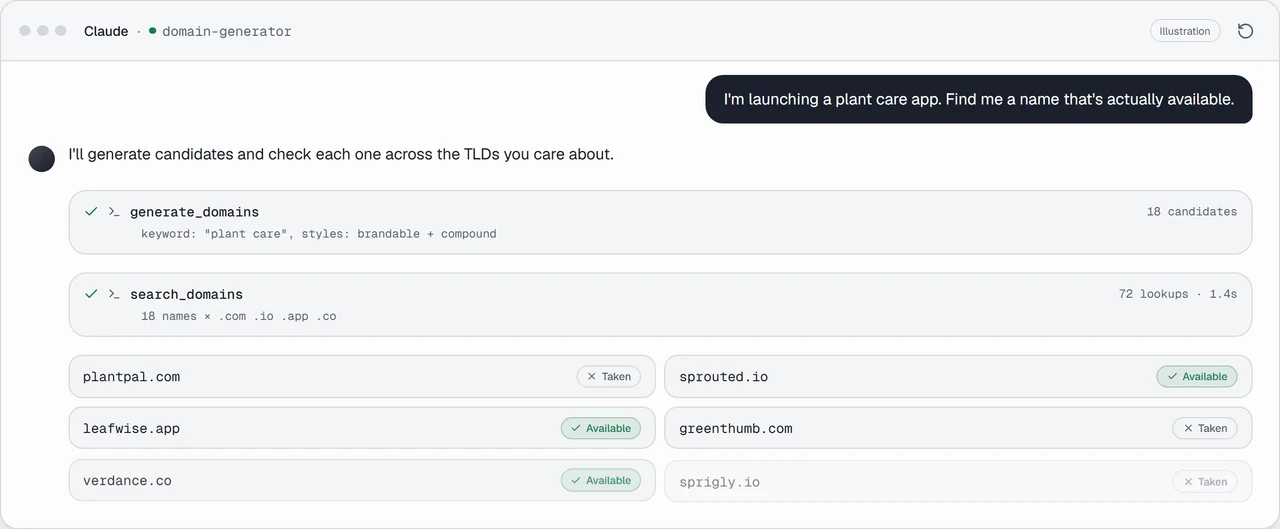
The prompt that works is the one you would say to a colleague: describe the business, name the constraint, and let the tools run. "I'm launching a plant care app, find me something short that is free in .com, .io or .app, and check the handle is free on GitHub and X too."
What happens next is four tool calls. generate_domains turns the description into candidates. search_domains checks all of them against those three extensions in one pass. check_usernames takes the survivors and probes the two platforms you named. save_domain keeps the two you liked, and they are in your library the next time you open the site in a browser.
The part that is hard to appreciate until you have done it is the follow-up. "Too cute, try again without the -ly ending" costs one more call, and the assistant still remembers which names it already ruled out. That is the loop the shortage of good names actually demands: not one clever search, but forty ordinary ones you do not have to type.
How it compares with other domain MCP servers
| Server | How it decides availability | Coverage | Account |
|---|---|---|---|
| Domain Generator | Daily registry list held in memory | 1,400 extensions | Required |
| mcp-domain-availability | DNS, then WHOIS, then socket | 50+ extensions | None |
| Instant Domain Search | Its own search API, "as fast as 10ms" | Not stated | Not stated |
| GoDaddy | Public registrar data | Registrar catalogue | "No GoDaddy account or API credential is required" |
Pick a different one when your question is different. A single authoritative check on one name the minute before you buy belongs at a registrar, not against any cached list. WHOIS record details, expiry dates and nameservers are not something this server returns. Neither is buying: no MCP server here registers anything, and the GoDaddy server says the same of itself. Where this one earns its place is breadth and speed at the stage where you still have forty ideas and no decision, which is also when deciding how many names to defend is cheapest to think about.
Frequently asked questions
Do I need an account to use it?
Yes, for every tool. Search and generation are free and anonymous on the website, but the MCP server connects as a specific person: it reads your favourite extensions, writes to your shortlist and reads your history, none of which exists without an account. An unauthenticated client gets a 401 from the transport before any tool runs.
Does it cost anything?
No. There is no paid tier, and the rate limits above apply to everyone equally.
Which clients work?
Anything that speaks MCP over streamable HTTP. Claude Code, Claude Desktop, Cursor, VS Code, Windsurf, Cline, Gemini CLI and Codex CLI have their exact file paths and field names written out on the connect page; the rest need the endpoint and nothing else.
Can it register a domain for me?
No. It reads availability and writes your own shortlist. Registration stays at a registrar, deliberately: an assistant that can spend money on a name it invented is a worse idea than it sounds.
How current is the availability data?
The registry list is rebuilt daily. Treat any result as accurate to within a day, and confirm at a registrar before you pay. For a name you are seconds from buying, that gap matters; for the first forty you are still weighing, it does not.
Does the assistant see my browsing?
It sees what the two history tools return: the names you searched and the keywords you generated from, on the website, up to 100 entries. It gets nothing else about the account, and nothing you do through the assistant is written back into that history.
What to do next
Connect a client at the MCP page, which has the snippet for yours and a key if you want one. If you would rather stay in a browser, domain search and the domain name generator run the same checks against the same list, and the shortlist you build in either place is the one the assistant reads.
Image credits
Backlit keyboard by Colin, CC BY-SA 4.0, via Wikimedia Commons.
